|
Size: 1182
Comment:
|
← Revision 12 as of 2023-05-19 14:24:04 ⇥
Size: 2762
Comment:
|
| Deletions are marked like this. | Additions are marked like this. |
| Line 1: | Line 1: |
| Access via gitlab or mudshark using root/sudo |
|
| Line 8: | Line 4: |
| {{{#!highlight bash | {{{#!bash |
| Line 12: | Line 9: |
| }}} The exact output you see will probably be slightly different, but the main point is that we have the ScrumPy-Innotargets.tgz file. If you don't see it will most likely be in the Downloads directory: {{{#!bash mark@CSMG-WS3:~$ ls Downloads/ ScrumPy-Innotargets.tgz }}} Otherwise please consult a demonstrator. We shall now create a new directory to keep relevant files in (best practice - keep ScrumPy related material separate from everything else) {{{#!bash |
|
| Line 13: | Line 20: |
| }}} and move the downloaded file to our newly created directory: {{{#!bash |
|
| Line 14: | Line 25: |
| }}} OR {{{#!bash mark@CSMG-WS3:~$ mv Downloads/ScrumPy-Innotargets.tgz ScrumPy }}} Now we can unpack the archive: {{{#!bash |
|
| Line 15: | Line 35: |
| mark@CSMG-WS3:~/ScrumPy$ tar zxf ScrumPy-Innotargets.tgz | mark@CSMG-WS3:~/ScrumPy$ tar zxf ScrumPy-Innotargets.tgz mark@CSMG-WS3:~/ScrumPy$ ls 11190523 ScrumPy-Innotargets.tgz }}} Note we now have a new directory, 11190523, the exact name may differ but it will have exactly 8 characters, this contains the unpacked source code: {{{#!bash |
| Line 23: | Line 49: |
| mark@CSMG-WS3:~/ScrumPy/11190523$ | |
| Line 25: | Line 50: |
| The actual source code is in the directory ScrumPy, the other files are to facilitate the installation process, which we can now complete: {{{#!bash mark@CSMG-WS3:~/ScrumPy$ sudo python3 ./install.py }}} You will see quite a lot of text scrolling up the screen as various dependencies are installed, so be patient. When it has finished you need to leave leave the installation directory, and you should now be able to run ScrumPy: {{{#!bash mark@CSMG-WS3:~/ScrumPy$ cd mark@CSMG-WS3:~$ ScrumPy3 }}} This should bring up the following window, in which case you are home and dry - otherwise consult a demonstrator. {{https://mudsharkstatic.brookes.ac.uk/Barcelona2023/ScrumPyMain.png|ScrumPyWindow|align="bottom",height="594",width="892"}} |
Download the ScrumPy software package (right click and select 'Save Link As', and then 'Save')
Now open a shell (aka terminal) window and locate the file you just downloaded. Depending on the linux distribution you are using it will be in either your home directory or in the 'Downloads" directory:
mark@CSMG-WS3:~$ ls
bin        Desktop  Downloads  print                    tmp
Computing  doc      model      ScrumPy-Innotargets.tgz
The exact output you see will probably be slightly different, but the main point is that we have the ScrumPy-Innotargets.tgz file. If you don't see it will most likely be in the Downloads directory:
mark@CSMG-WS3:~$ ls Downloads/
ScrumPy-Innotargets.tgz
Otherwise please consult a demonstrator. We shall now create a new directory to keep relevant files in (best practice - keep ScrumPy related material separate from everything else)
mark@CSMG-WS3:~$ mkdir ScrumPy
and move the downloaded file to our newly created directory:
mark@CSMG-WS3:~$ mv ScrumPy-Innotargets.tgz ScrumPy
OR
mark@CSMG-WS3:~$ mv Downloads/ScrumPy-Innotargets.tgz ScrumPy
Now we can unpack the archive:
mark@CSMG-WS3:~$ cd ScrumPy/
mark@CSMG-WS3:~/ScrumPy$ tar zxf ScrumPy-Innotargets.tgz
mark@CSMG-WS3:~/ScrumPy$ ls
11190523  ScrumPy-Innotargets.tgz
Note we now have a new directory, 11190523, the exact name may differ but it will have exactly 8 characters, this contains the unpacked source code:
mark@CSMG-WS3:~/ScrumPy$ cd 11190523/
mark@CSMG-WS3:~/ScrumPy/11190523$ ls
BuildLibs.py  debian11.py      LICENSE      syntoin      Update.py
BuildRel.py   debian8.py       README       Ubuntu16.py
CHANGELOG     INSTALL          ScrumPy      Ubuntu18.py
config.txt    install_conf.py  ScrumPy.e4p  Ubuntu20.py
debian10.py   install.py       synfromin    Ubuntu22.py
The actual source code is in the directory ScrumPy, the other files are to facilitate the installation process, which we can now complete:
mark@CSMG-WS3:~/ScrumPy$ sudo python3 ./install.py
You will see quite a lot of text scrolling up the screen as various dependencies are installed, so be patient. When it has finished you need to leave leave the installation directory, and you should now be able to run ScrumPy:
mark@CSMG-WS3:~/ScrumPy$ cd
mark@CSMG-WS3:~$ ScrumPy3
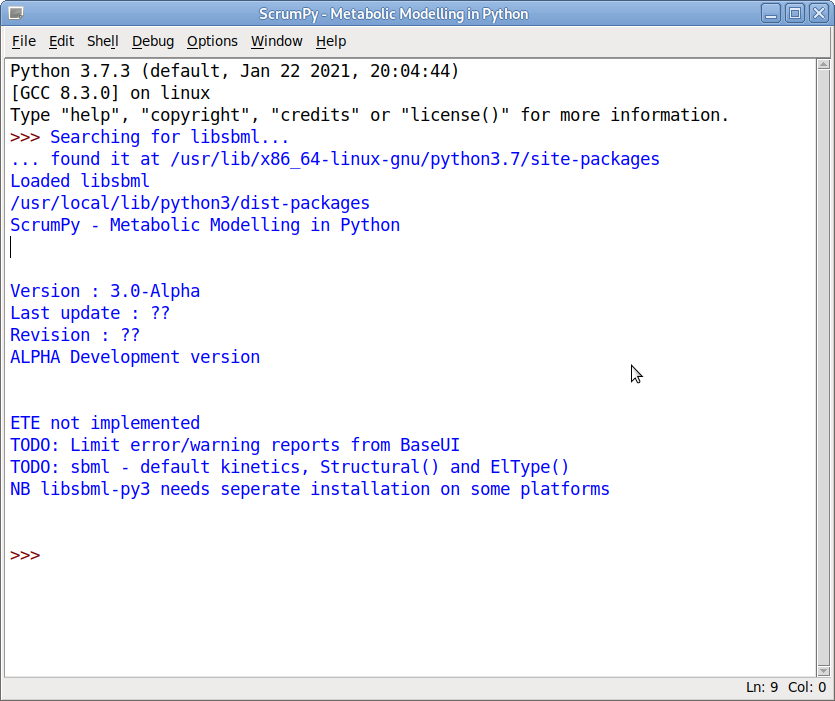
This should bring up the following window, in which case you are home and dry - otherwise consult a demonstrator.